What is this?
The Windows Webserver was developed for testing PHP and CGI/FCGI programs under Windows, without installing an Apache or IIS environment. The Webserver is easy to install and comes with buildin PHP 8.3.0, FastCGI support, mod_rewrite and SSL/TLS 1.2. Also FTP(S), WebDAV and DNS is integrated. WWebserver is not Apache and was developed from the scratch. It was tested with common OpenSource applications like Wordpress, Joomla, Drupal, Typo3, Magento, phpMyAdmin, PIWIK, AWstats ...
Installation and Configuration
To support the further development of WWebserver i decided to make WWebserver with PHP 8.x and 7.4.32 chargeable with price of 10 $ (via PayPal).
All older versions are free.
1. Install complete program with PHP 8.3.0 (Win7+, Win10+)
wwebserver_php_830_setup.exe (39.1 MB) - 10 $
or PHP 7.4.32 (Win7+, Win10)
wwebserver_php_7432_setup.exe (35.6 MB) - 10 $ or PHP 7.3.11 wwebserver_php_7311_setup.exe (35.5 MB) - Free or older versions ...
Or with PHP 5.4.45 (WinXP+)
wwebserver_php_5445_setup.exe (16.6 MB) - Free
Or use only command line, the smallest version without buildin PHP, SSL, FTP, WebDAV, WWadmin.
You have to download your preferred PHP version manually and configurate it with FastCGI.
wwebserver_20_cmd.zip (210 KB) - Free
2. Type in your Host, Port, Document Path and start it.
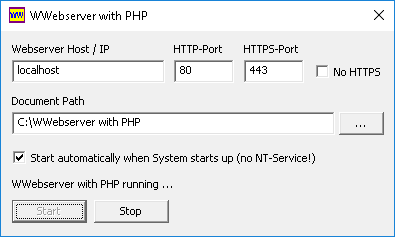
The default HTTP Port is 80, but you can choose
any other Port if there is just running another Webserver on your system.
If you dont need SSL you can mark checkbox No HTTPS.
You can bind to several ip addresses and ports with separating by comma.
Or type in all to use all IP addresses available on your system.
After starting you can close the window and control the Webserver with the Taskbar Icon.
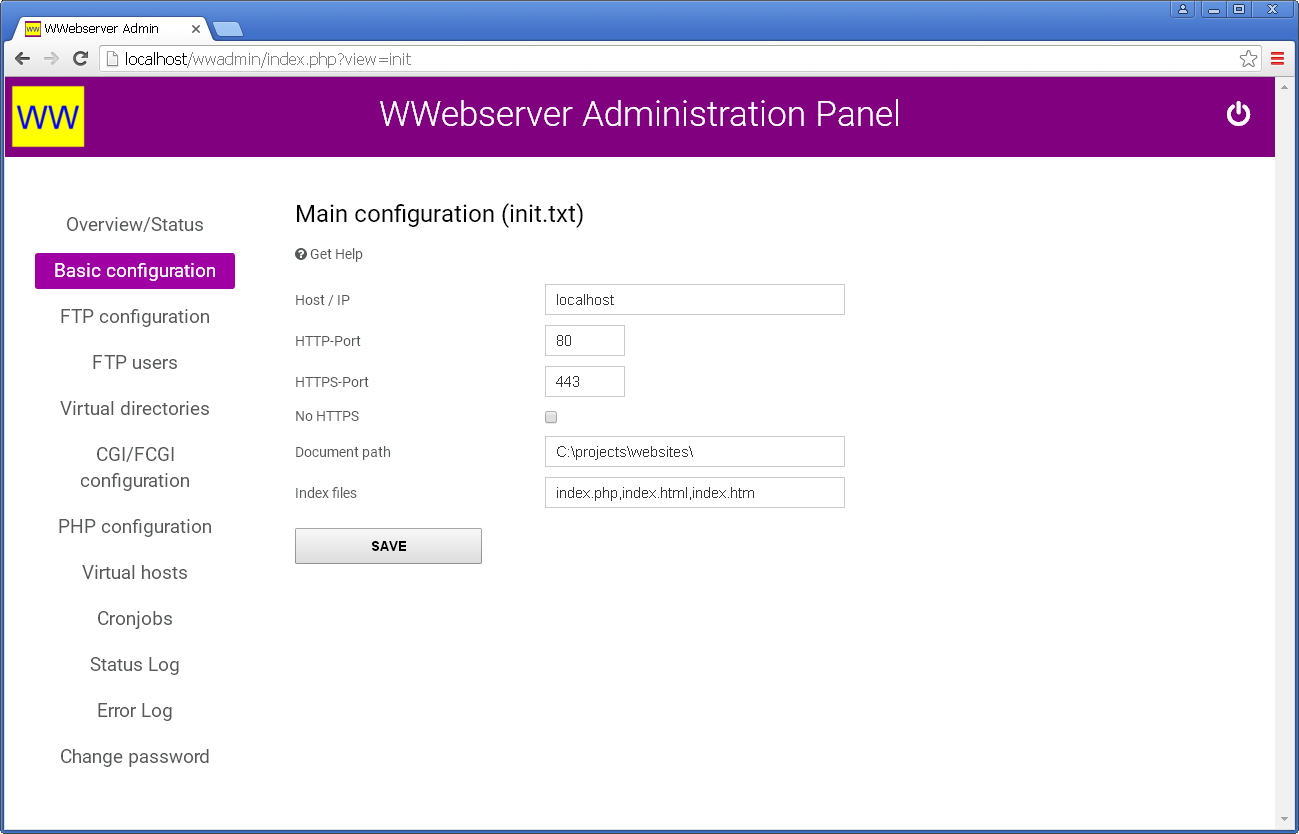
Or call https://localhost/wwadmin/ for Webadmin panel.

3. Open your Webbrowser and start your PHP application like:
http://localhost/index.php
Virtual Directories
You can define virtual directories to handle multiple document paths.
Therefore edit the following configuration file:
C:\WWebserver\cfg\vdir.txt
# Definitions of virtual directories
# <Path>;<Directory>
#
# Note: There must be an '/' on end of <Path>
pma/;C:\phpMyAdmin
typo3/;C:\typo3
drupal/;C:\drupal
wordpress/;C:\wordpress
You can start the applications now verry simple like: http://localhost/wordpress
Note: After changing vdir.txt STOP and START Webserver again.
Another way to handle multiple applications is to register Virtual Hosts.
CGI Programs
You can define own CGI Programs for example Perl or Ruby.
Therefore edit the following configuration file:
C:\WWebserver\cfg\cgi.txt
# Definitions of CGI programs
# <Alias 1> <Alias 2> ...;<Full path to CGI program>
# <Alias 1> <Alias 2> ...;PHPBuildIn
# <Alias 1> <Alias 2> ...;PHPFCGI [<Full path to php-cgi.exe>]
# <Alias 1> <Alias 2> ...;FCGI <Full path to FastCGI program> | <IP>:<Port> or <Pipename>
# <Alias 1> <Alias 2> ...;FCGI <IP>:<Port> or <Pipename>
.php .php4 .php3;PHPFCGI
.rb;C:\ruby\bin\ruby.exe
.pl;C:\perl\bin\perl.exe
In this example we associate file extensions .rb with Ruby scripts and .pl
with Perl scripts.
.php .php3 .php4 files are associated with PHP FastCGI of the current installed version.
Per default PHP will be used as PHPBuildIn version which means that no separate PHP processes will be created in deviation to PHPFCGI.
In my opinion PHPBuildIn is the fastest version of PHP but you cannot use different PHP versions on Virtual Hosts with PHPBuildIn.
Note: After changing cgi.txt please STOP and START Webserver again.
PHP Configuration
You can control the PHP environment with the php.ini file:
C:\WWebserver\cfg\php.ini
You can enable/disable the PHP extension DLL's located in directory:
C:\WWebserver\ext
Note: After changing php.ini you have to EXIT and RESTART the Webserver.
Virtual Hosts
You can define virtual hosts with own home directories and PHP settings. Therefore edit the following configuration file:
C:\WWebserver\cfg\vhost.txt
# [<unique name>=]<hostname1[:port]>[,<hostname2[:port]> ...];<Document directory>[;<Access log filename>]
# You can create for every virtual host a own configuration directory: cfg/vhost/<hostname|unique name>
# You can define a individual log file for every host here. Following placeholders are possible: %m for month, %d for day, %Y for year
# Logging is optional. The log format is defined in init.txt
# You have to use a <unique name> to identify the SSL certificate for multiple domains.
# The SSL certificate must be placed in ssl\<unique name>.crt and ssl\key\<unique name>.key
# Examples
mydomain.com,www.mydomain.com;C:\MyDomain.com\www;C:\MyDomain\log\access%Y%m%d.log
myname=subdomain1.mydomain.com,subdomain2.mydomain.com,subdomain3.mydomain.com;C:\MyDomain.com\subdomains
localhost:9090;C:\localhost_9090
localhost:8080;C:\localhost_8080
Note: A virtual host tells the web server the home directory of a domain.
However, the domain must be resolvable via DNS so that your web browser can find the IP address of the domain, which must be the IP on which the web server is running.
URL Rewriting
Read more about mod_rewrite, Redirect and .htaccess.
Directory Protection
WWebserver understand the HTTP Basic Authorization.
Read more about directory protection.
Logfiles
WWebserver with newest version can create Apache compatible access logs.
You can enable the default logging in cfg\init.txt
# Log every request with Apache compatible log file format
enableLog = true
# You can define the following placeholders for log file: %m for month, %d for day, %Y for year
logFile = log/access.log
# 0 = default log format with HTTP referer and user agent, 1 = simple log format
logFormat = 0
# Log with hostname
logWithHostname = true
Note: You may disable default logging and define individual log files in vhost.txt.
SSL/TLS 1.2
WWebserver support TLS 1.2 per default (based on OpenSSL v1.1.1). Self signed X.509 certificates (RSA 2048 Bits) are generated automatically for every hostname. You can install your own certificates in the following directory:
C:\WWebserver\cfg\ssl for public certificates
C:\WWebserver\cfg\ssl\key for private key files
Certificates and key files must have the following filename convention: <hostname>.crt, <hostname>.key or <unique name>.crt, <unique name>.key (see Virtual Hosts)
You can ignore the www. prefix. Every certificate file will be checked automatically on www. domains.
Note: Self signed certificates are marked as insecure by most web browsers and are verry slow because of the TLS handshake will fail.
Please use https://<IP address> instead of hostname for a fast HTTPS connection.
You can create own Let's Encrypt Certificates with ACME Client Utility.
FTP-Server with explicit TLS
Read manual: Configuration of the internal FTP-Server
DNS-Server
Read manual: Configuration of the internal DNS-Server
WebDAV
If you want to get WebDAV access to the document path you have to create a WWAdmin password with reset_pwd.bat
After that you can login with your WebDAV client and wwadmin user. FTP users in cfg\ftpuser.txt are allowed to access they're resources with following URL:
http(s)://<hostname>/webdav-users/<user>/
The path /webdav-users/... will always prompt a user login and link to the home directory of the specified user.
Note! You dont have to enable FTP to get WebDAV access with wwadmin user or FTP users.
Cronjobs
You can execute cronjobs with WWebserver. Crontab is organized like Linux crontab. Please edit following file:
C:\WWebserver\cfg\crontab.txt
# <minute> <hour> <day> <month> <weekday> <url>|exec <cmd> [<resultfile>]
# Weekday: 1 = Mon, 0 = Sun
# Special keywords:
# @startup called on first startup
# @start called on first startup and after restart
# @shutdown called on final shutdown
# @stop called on final shutdown and before restart
# In this example we call every 10 minutes a URL and save the result in cron_result.html
*/10 * * * * https://www.mydomain.com/program.php?param1=1¶m2=2 cron_result.html
# In this example we execute a local program (wget.exe) on Saturday 23:00
0 23 * * 6 exec wget.exe http://www.mydomain.com/program.php?param1=1¶m2=2 -O cron_result_wget.html
# In this example we call a script on startup
@startup * * * * exec php.exe startup_script.php
Note: You dont need to restart Webserver after changing crontab.txt.
Server Optimization
Number of parallel requests, timeouts, enabling/disabling .htaccess and directory index can be configurated with following configuration file:
C:\WWebserver\cfg\speed.txt
Special Files
You can lock access to specific directory and all sub directories simply by creating the following empty file in this directory:
forbidden
You can force a restart or stop of WWebserver by creating the following empty files in the installation directory:
restart stop
Command Line Options
WWebserver comes as GUI and CLI version.
You can see all command line options with --help:
C:\WWebserver\wwebserver_cmd.exe --help
Server Administration Panel
http://localhost/wwadmin/
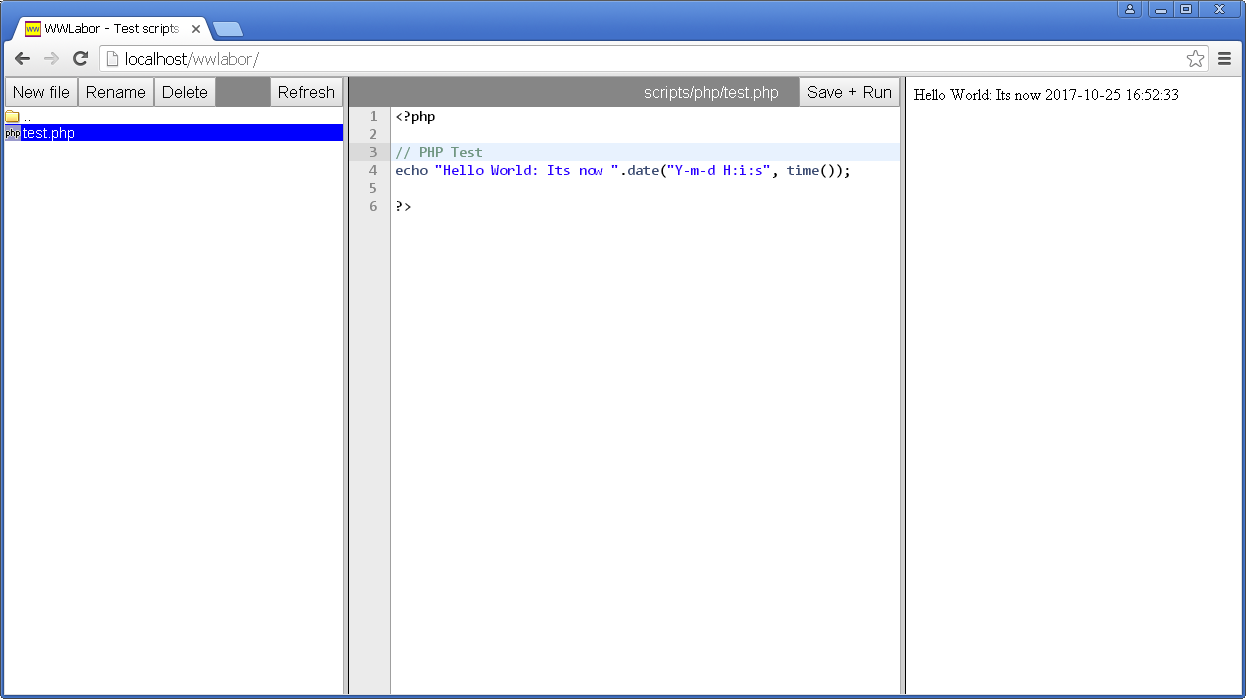
Experimental Laboratory for Scripts
Read manual: Install WWLabor
Forum
Bug reporting and discussion: Take a look at the Windows Webserver Forum.
Old versions (also for Windows 2000) you can find here.